What you will learn
- Where to look at the website address and what the lock really means
- How to tell an ad from the official site in search results
- The signs of a fake bank page
- How to create a strong password and protect sign-in with a code
- What to do when a message says your card is blocked
What you need
- A phone or computer with a browser
- 10 minutes without rushing
- The Internet trainer: a practice browser with no real websites
Key terms
- Browser
- The program you use to open websites: Chrome, Safari, Firefox, Edge and others.
- Website address
- The name of a site in the address bar, for example vantemio.com. It tells you where you are.
- Phishing
- A scam in which fraudsters copy a real website or write in a bank’s name to trick you into giving away a password, card number or code.
- Two-step sign-in
- Signing in with two steps: a password, then a code from an app or SMS. Even if your password is stolen, nobody can sign in without the code.
Step by step
The orange numbers on the images match the numbers in the text. Tap an image to see it in full.
- 01
Check the address every time
The address bar (number 1) shows which site you are on. Look at the site name before the first slash: here it is mybank.example. Check it every time before you sign in or enter any details.
The “Back” button (number 2) takes you to the previous page. The lock next to the address means just one thing: the connection is encrypted (number 3). It does not prove the site is honest. Scam sites have a lock too.
- Open your bank and important services from bookmarks, or type the address yourself
- Read the whole site name, letter by letter
- Do not trust a site just because of the lock
- Do not enter your password on a site whose address you do not recognise
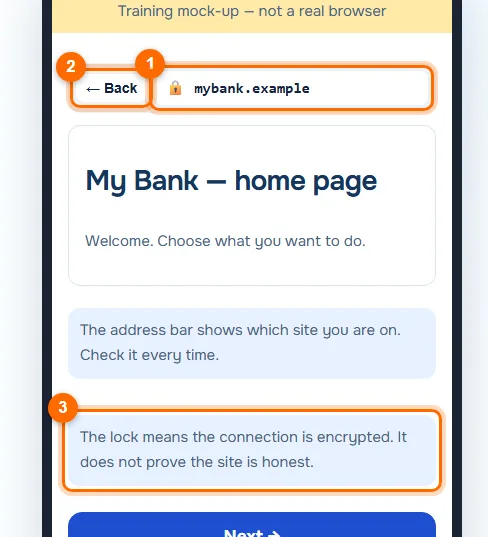
The address bar, the “Back” button and the lock hint. - 02
Tell ads from search results
You are searching for how to pay utility bills (number 1). The first result is often an ad labelled “Ad” (number 2). That spot is paid for, and a promise of “no fees” guarantees nothing.
The service’s official site (number 3) may be lower down. Before you tap, check the address: city-services.example matches the name of the service, while pay-fast.example is an unrelated site.
Tip. If you know the official address, save it as a bookmark instead of searching for it every time.
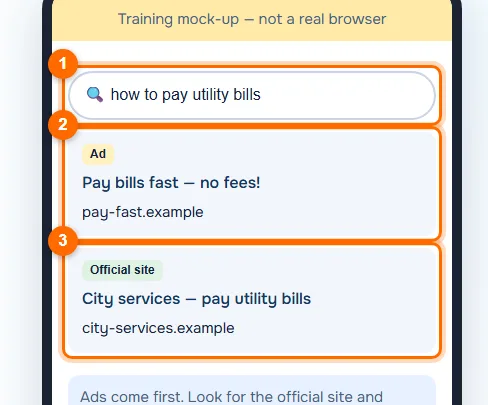
Search results: an ad labelled “Ad” and the official site. - 03
Recognise a fake bank page
The page looks like a bank, but the address is different (number 1): mybank-login.example instead of mybank.example. Scammers add words like login, secure or verify to the real name, or change one letter or the ending of the address.
The form asks for a card number and an SMS code (number 2). A real bank never asks for both together on a page you reached through a link: an SMS code confirms a sign-in or a payment. The screen shows the right action (number 3): close the page and enter nothing.
Important. If you have already entered your details, call your bank right away on the number on the back of your card and ask them to block it.
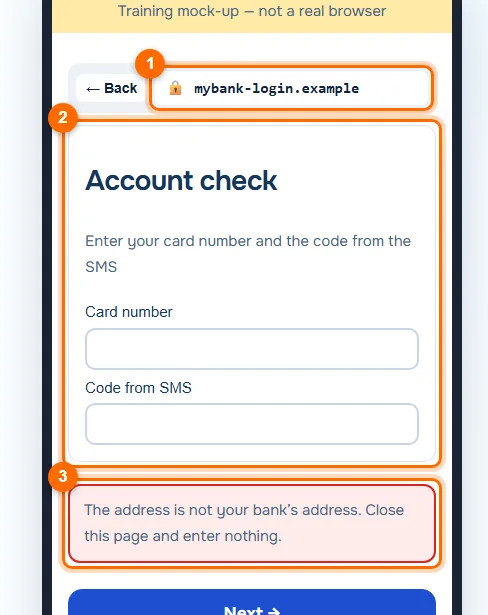
The fake page asks for a card number and an SMS code. - 04
Create a long password for every site
In the “New password” field (number 1), it is better to enter a long phrase than a short string of symbols. Four random simple words, such as “lamp-cloud-guitar-north”, are stronger than “Qw3rty!”: the phrase is easier to remember and harder to guess.
The tips on the screen (number 2) remind you of the essentials: a separate password for every site, and two-step sign-in turned on for important accounts. If one site is hacked, your other accounts stay safe.
- Keep your passwords in the password manager of your browser or phone
- Turn on sign-in with a code for email, your bank and social networks
- Do not use one password on several sites
- Do not share SMS codes with anyone, even “bank staff”
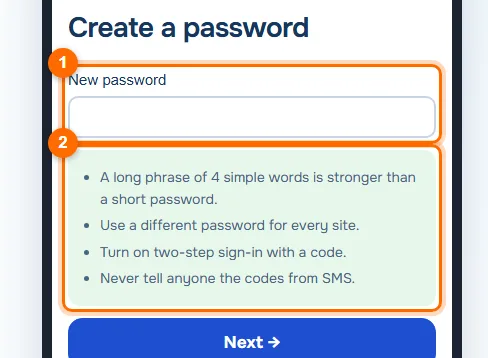
The new password field and tips about passwords and sign-in with a code. - 05
Delete the scam message
A message arrives from an unknown number: “Your card is blocked. Follow the link to unlock it” (number 1). Scammers play on fear and urgency so you do not have time to think. Do not open the link.
The hint on the screen (number 2) explains: a bank does not send such links. If you are unsure, call your bank on the number on the back of your card. In the trainer, tap “Delete the message” (number 3).
Tip. Signs of a scam: urgency, a threat of blocking, a link to “unblock” and a request for a code or card details.
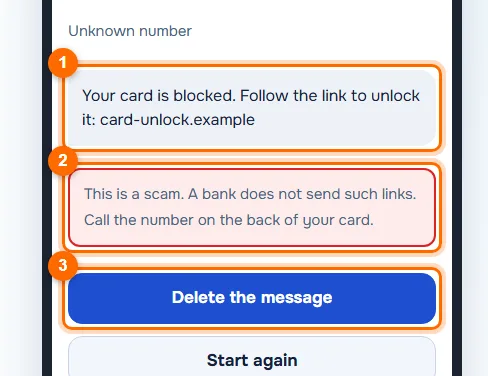
A message about a “blocked card”, a hint and the delete button.
Common mistakes and what to do instead
“The site has a lock, so it is safe”
The lock only means encryption. Check the whole site name.
Tapping the first link in search results
Ads often come first. Look for the “Ad” label and check the address.
One password for email, bank and social networks
If one site is hacked, all your accounts open up. Every site needs its own password.
Following a link in an SMS about a blocked card
Call your bank on the number on your card: a bank does not send links to unblock it.
Test yourself
Answer in your head first, then reveal the answer.
1Is a site with a lock in the address bar definitely safe?Answer
No. The lock means the connection is encrypted. A scam site can have a lock too, so check the site name.
2Which address is real: mybank.example or mybank-login.example?Answer
mybank.example. Added words such as login, secure or verify are a common trick in fakes.
3You get an SMS with a link to unblock your card. What should you do?Answer
Do not open the link, delete the message and call your bank on the number on the back of your card.
In short
Check the website address, not the lock. Tell ads from official sites, never enter a card number or codes on pages you reached through links, and use long, different passwords with two-step sign-in. Answer “blocked card” messages by calling your bank on the number on your card.