What you will learn
- How your own wallet differs from keeping crypto on an exchange
- How to write down and check a recovery phrase correctly
- What you can share (the address) and what you must never show (the phrase, the key)
- How to check the network and address before receiving a transfer
- How to recognise a scammer who writes “from support”
What you need
- A sheet of paper and a pen
- 10 minutes in a quiet place
- The Wallet trainer: a practice mock-up with no money and no keys
Key terms
- Crypto wallet
- An app or device that stores your keys and signs transfers.
- Self-custody
- Only you hold the keys. Nobody can freeze your funds, but nobody can restore your access for you either.
- Recovery phrase
- 12 or 24 words from which all the wallet’s keys can be restored. It is also called a seed phrase.
- Address
- The public number of a wallet for receiving funds. You can share it.
- Network
- The blockchain a transfer goes through, for example Base or Solana. The sender and the recipient must choose the same network.
Exchange or your own wallet
| On an exchange | In your own wallet | |
|---|---|---|
| Who holds the keys | The exchange company | Only you |
| Can the funds be frozen | Yes, the exchange can restrict an account | No |
| If you forget your password | Support can help you recover access | Only the recovery phrase can restore access |
| Who is responsible for security | Mostly the exchange | You are |
Step by step
The orange numbers on the images match the numbers in the text. Tap an image to see it in full.
- 01
Create a wallet
Tap “Create a new wallet” (number 1). In a real app the steps are the same: create, write down the phrase, check it.
The yellow banner (number 2) reminds you that this is a practice mock-up: there is no money and no real keys here, so mistakes are safe.
Tip. Install a wallet only from the official app store or from a link on the developer’s website. Fake apps are one of the most common ways crypto gets stolen.
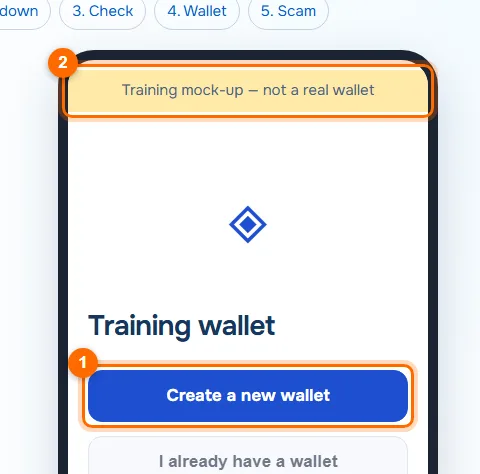
The practice wallet: the create button and the trainer label. - 02
Write down the recovery phrase
The wallet shows 12 words (number 1). Write them with a pen on paper, strictly in order and with their numbers, and check the spelling of each word. The tip on the screen (number 2) explains why: whoever knows these words owns the wallet.
When you have written them down, tap “I have written the words down” (number 3).
- Paper and a pen, words in order and with numbers
- Keep the note in a safe place, away from your phone
- Screenshots, photos, phone notes, cloud storage, email
- Sending the phrase to anyone, including “support” or an AI chat
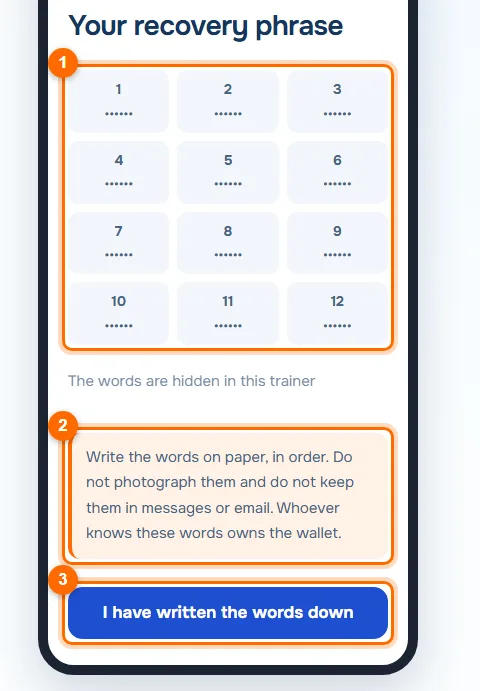
Twelve numbered slots for the words and a tip on how to store them. - 03
Confirm the requested words
The wallet checks that you wrote the phrase down correctly: it asks for the words at certain positions, here No. 3 and No. 9 (number 1). Enter them from your paper and tap “Confirm” (number 2).
Only the wallet itself checks this, and only when you create it. Websites, people and “support” never ask for your phrase.
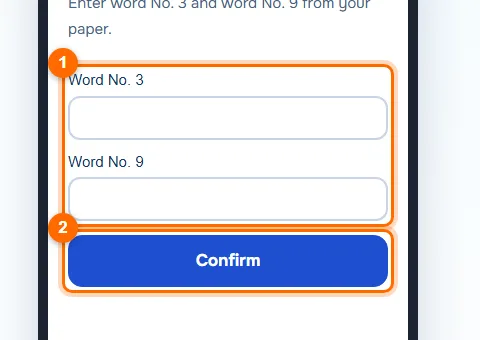
The check: the wallet asks for words No. 3 and No. 9. - 04
Check the network and address
The network is shown at the top (number 1). In the trainer it is the Base Sepolia test network. Below it is the address (number 2): you can send it to people so they can transfer funds to you. The “Receive” button (number 3) opens the address and a QR code.
Before every receipt, make sure the sender chose the same network and the same coin. A transfer on a different network can be lost.
Tip. Check the whole address, not just the first and last characters: scammers make look-alike addresses.
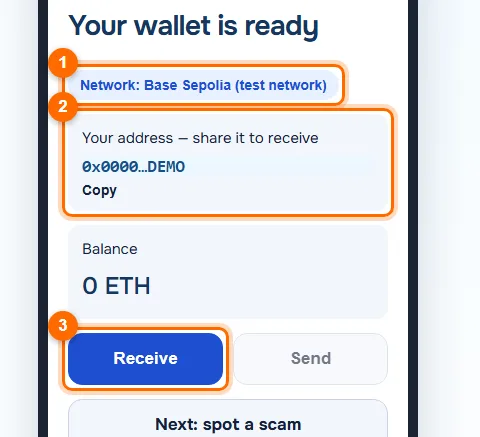
The finished wallet: the network, the receiving address and the “Receive” button. - 05
Spot a scam message
The message (number 1) scares you with a block and asks you to send your recovery phrase. Only scammers write like this: real support never asks for the phrase, and the hint on the screen (number 2) says the same.
Tap “Close and do not reply” (number 3). In real life it is better to delete such a message and block the sender.
Important. Urgency, a threat of blocking, and a request for your phrase, key or “wallet sync” are sure signs of a scam.
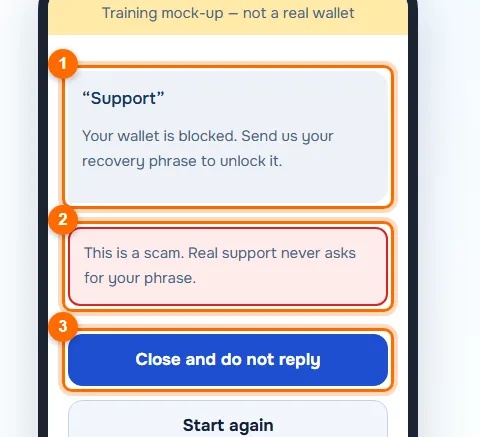
A message from “support” and a scam warning.
Common mistakes and what to do instead
Photographing the phrase “just in case”
The photo ends up in the cloud and the gallery. Use paper only, in order.
Keeping the note together with the phone
Keep it separately, in a safe place. You can make two copies in different places.
Believing “support” that asks for the phrase
Real support never asks for the phrase. It is a scammer.
Receiving a transfer on the wrong network
Check the network and coin with the sender. Send a small test amount first.
Test yourself
Answer in your head first, then reveal the answer.
1What can you share with others: the address or the recovery phrase?Answer
Only the address. The recovery phrase gives full control of the wallet, and you never show it to anyone.
2You lost your phone, but the phrase is written on paper. What about your money?Answer
It is safe: with the phrase you can restore the wallet on a new device.
3“Support” writes that your wallet is blocked and asks for the phrase. What should you do?Answer
Do not reply, delete the message and block the sender. It is a scam.
In short
A wallet holds keys, and the recovery phrase is the master key to everything. Write it on paper in order, show it to nobody, check the network and address before a transfer and never reply to anyone who asks for the phrase.